Are Green Tiles Locked in Waffle | Can You Swap Them?
Quick answer: Are green tiles locked in Waffle? Yes. Once a letter turns green, it is in its correct spot and it is locked in place. You cannot select it, drag it, or swap it with another tile. That lock is not a limitation. It is the single most useful feature on the board, because a locked tile is a fact you can build your whole solve around.
You have probably asked this question in the middle of a puzzle. A green tile sits in a spot where you are sure another letter belongs, or you want to use a green letter as part of a swap that fixes two tiles at once, and the game will not let you touch it. This guide explains exactly what the lock means, why the game locks green tiles, how locked tiles change your strategy, and what to do when a locked tile seems to be in your way.
If you are still learning the color rules, start with our guide to what the colors mean in Waffle. It explains green, yellow and grey with board examples. If you already know the colors and want the short version, the next section gives you the answer in one paragraph.
The Short Answer: Yes, Green Tiles Are Locked
Green tiles are locked. The moment a letter turns green, whether it started green or turned green after one of your swaps, it is fixed in that square for the rest of the puzzle. You cannot move it, and the game will not let you select it as part of a swap. That rule holds on this site and on the original game.
The SolveWordGames strategy guide answers the question directly in its FAQ: “Can Green Tiles Be Swapped? No. Green tiles are locked permanently in their correct position and cannot be selected or moved.” Insider Gaming’s Waffle guide says the same thing in plainer words: “Green tiles are correct and lock in place.” Nerdschalk’s guide to the original game explains that “the green letters get locked in the tile once recognized by the system.”
That agreement across independent guides matters, because the lock is not a quirk of one version. It is a core rule of Waffle, and every version of the game that uses the green, yellow and grey color system follows it. On thewafflegame.uk, the standard board, Unlimited mode and Deluxe mode all lock green tiles the same way.
So the answer is settled. The interesting part is what the lock means for how you play, and that is what the rest of this guide covers.
What Locked Actually Means in the Game
Locked means three specific things, and it helps to know all three before you plan a solve.
First, a green tile cannot be swapped. If you tap a green tile and then tap another tile, nothing happens. The swap does not count against your swap budget, and the board does not change. The game simply ignores the attempt. That is good news: you cannot waste a swap by accident on a tile that is already correct.
Second, a green tile cannot be dragged. Waffle lets you drag a yellow or grey tile onto another tile to swap them, but a green tile does not respond to a drag. It stays where it is. On a phone, that matters, because a stray finger can easily grab the wrong tile on a small board. The lock protects you from your own thumb.
Third, a green tile is a confirmed fact. Green means the right letter in the right place, confirmed by the game’s own solution. It is not a guess, and it is not a hint. It is the one thing on the board that is certainly correct. Every other tile is a question. Green tiles are answers.
There is one more detail worth knowing. A tile can turn green in the middle of a solve, and the lock applies the moment it does. If your third swap turns two tiles green, both of those tiles are locked from that moment on. You do not need to remember which tiles started green and which ones you fixed. Green is green, and green is locked.
Green Is Not the Same as Yellow
New players sometimes mix up green and yellow, and the lock is the reason the difference matters. A yellow tile belongs in its word but sits in the wrong spot, so it must move. A green tile belongs in its spot, so it must not move. If you treat a yellow tile like a green tile, you will leave a word unsolved. If you treat a green tile like a yellow tile, you will waste swaps trying to move a letter that is already home.
The color guide puts it simply: green means right letter, right place. Yellow means right letter, wrong place. Grey means the letter does not belong in that word at all. Only green locks. Yellow and grey tiles are always free to swap, and they are the only tiles you should ever be moving.
Why Green Tiles Lock
The lock exists for a reason, and understanding the reason makes the rule feel less like a restriction and more like a gift.
Waffle is a game about rearranging letters, and every swap costs you one of your 15 moves. Without the lock, a careless swap could undo correct work. You might fix a word, then accidentally move one of its letters while fixing another word, and then spend two more swaps putting it back. The lock removes that risk entirely. Once a letter is correct, it stays correct. Your progress only ever moves forward.
The lock also turns the board into a logic puzzle instead of a guessing game. Because green tiles are fixed facts, you can reason from them. A green letter in the top row tells you the first letter of the top word and the first letter of the left column word. A green letter in the centre tells you the middle letter of the middle row. Each locked tile narrows the possibilities for the words around it, and a board with five or six green tiles is often half solved before you make a single swap. Without the lock, those clues would be unreliable, because a tile you were reasoning from could be moved by your next swap.
There is a third reason, and it is about fairness. Every puzzle in Waffle is designed to be solvable in 10 swaps on the original game, which is the par score that earns the top star rating. That design only works if correct letters stay put. If green tiles could move, a solver could accidentally break a solved word and turn a 10-swap puzzle into a 14-swap puzzle through no fault of logic. The lock keeps the puzzle honest: the swap count measures your planning, not your luck.
On this site there is no star score, so the swap count is your own challenge to beat. Our guide to how many swaps you get in Waffle explains the 15-swap budget and the 10-swap par in full. The lock is what makes a low swap count possible at all.
Corners and the Centre: Where Locks Matter Most
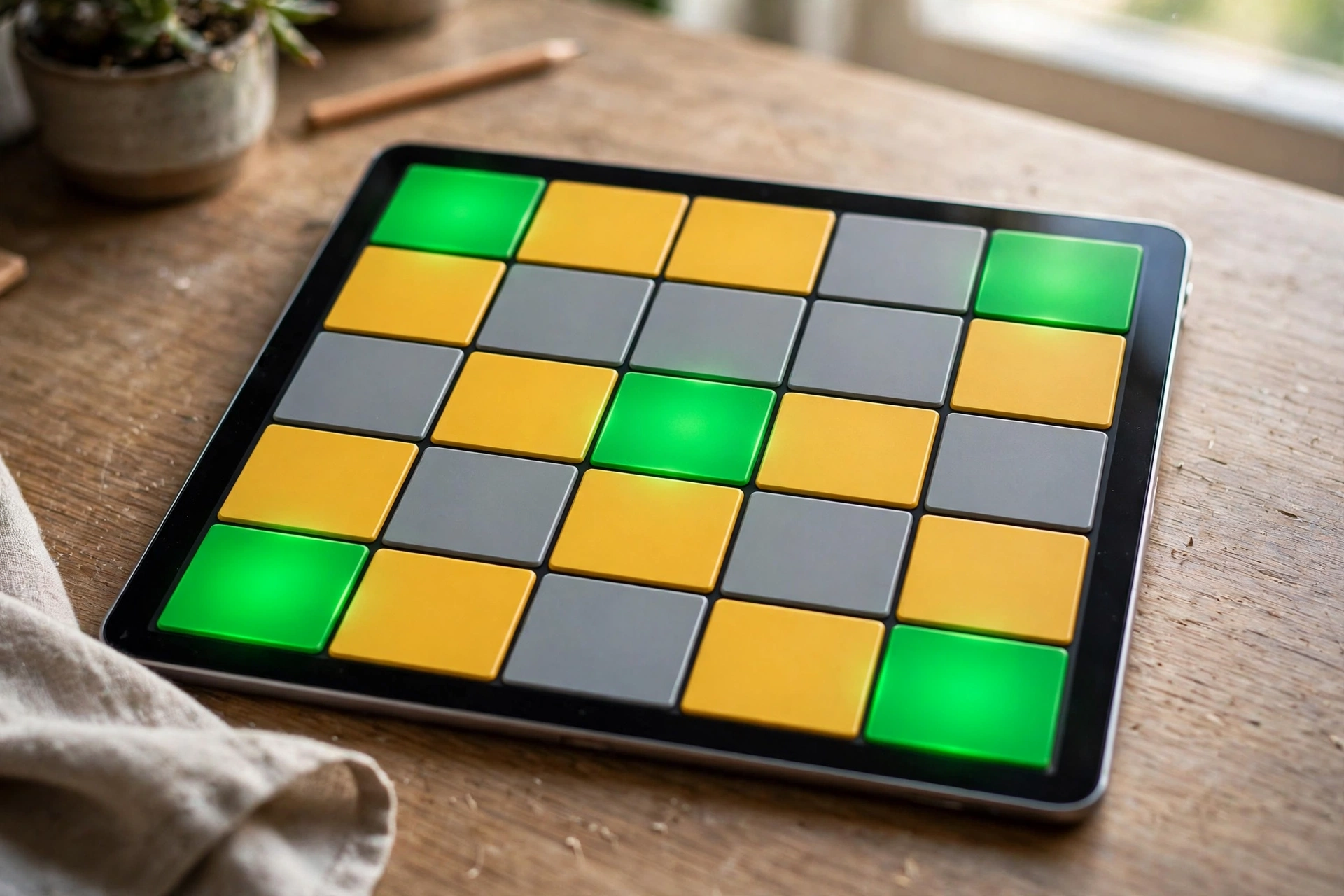
Not all green tiles are equal. A green tile at a crossing, where a row word and a column word meet, locks down two words at once. A green tile in the middle of a row locks down one word only. That difference decides where you should look first.
The four corners are the most valuable locks on the board. Each corner tile belongs to two words: the top left corner starts the top row and the left column, the top right corner ends the top row and starts the right column, the bottom left corner starts the bottom row and ends the left column, and the bottom right corner ends the bottom row and the right column. A green corner fixes the first or last letter of two words in one move, and it tells you the shape of both words before you have guessed a single letter.
The centre tile is the next most valuable lock. It sits in the middle of the middle row, and on the standard 5 by 5 board it belongs to the middle row only, because there is no down word through the centre column. A green centre tile gives you the middle letter of the middle word, which is often enough to guess the word outright. On the Deluxe board, which is 5 by 6 with three down words, the centre tiles matter even more, because more of them sit on crossings. Our Deluxe guide explains how the bigger board changes the value of each lock.
The least valuable locks are the green tiles in the middle of an edge, for example the second tile of the top row or the fourth tile of the bottom row. Those tiles belong to one word only, and they tell you less about the board. They are still facts, and they still anchor a word, but they do not do double work the way a corner does.
Here is the practical rule: when you start a board, read the corners first. Count how many corners are green, and write down what each one tells you about its two words. Then read the centre. Then read the rest. That order takes about thirty seconds, and it gives you the skeleton of the whole puzzle before you spend a single swap.
A Worked Example: Two Green Corners
Imagine a board where the top left corner is a green B and the bottom right corner is a green E. The B tells you the top row starts with B and the left column starts with B. The E tells you the bottom row ends with E and the right column ends with E. Two tiles, four facts, and you have not made a move yet.
Now suppose the top row also has a yellow L and a yellow O. You know the top word starts with B and contains L and O somewhere. That narrows the word to a small set of possibilities, and the most common English pattern will usually be right. The same logic works on the bottom row: it ends with E, and any yellow letters in that row belong somewhere in the word. Work outward from the locked corners, and the words reveal themselves.
This is why experienced players say to solve corners first. It is not a slogan. It is a consequence of the lock: corners are the only tiles that give you two facts for the price of one, and green corners are facts you can trust.
How Locked Tiles Change Your Strategy
Once you accept that green tiles cannot move, your whole approach to a board changes. Here are the five shifts that matter most.
First, you plan around green tiles instead of through them. A swap is a move between two tiles, and if one of those tiles is green, the swap cannot happen. So every swap you plan must use two non-green tiles. That sounds obvious, but it changes how you look at the board. Instead of asking which two letters should trade places, you ask which two movable letters should trade places, and you check that neither one is green before you commit.
Second, you use green tiles as anchors for guessing. A row with two green tiles is nearly solved, because only three letters are unknown and two of them are pinned in place. A row with one green tile is a pattern with a known letter, which is much easier to solve than a row with no known letters at all. Start with the rows and columns that have the most green tiles, because those words will fall first, and each word you finish gives you more green tiles to work from.
Third, you stop wasting swaps on finished words. A common beginner mistake is to keep swapping letters inside a word that is already correct, because the player has not noticed that all five tiles are green. Before you swap, check whether the word is done. If all five tiles are green, move on. The lock means the word cannot be improved, and any swap inside it would be impossible anyway.
Fourth, you protect your swap budget by planning double-green swaps. The best swap in Waffle turns two tiles green at once. That is only possible when you pair two movable tiles that belong in each other’s spots. Green tiles cannot be part of that pair, so the pair must come from the yellow and grey tiles. Look for two yellow tiles that belong in each other’s positions, and swap them. Our guide to getting 5 stars in Waffle explains the double-green swap in detail, with a worked example.
Fifth, you learn to trust the board. Because green tiles are confirmed by the game itself, you never need to second-guess them. If a green tile seems wrong, the tile is not wrong. Your guess about the word is wrong. That sounds harsh, but it is liberating: it means the puzzle always has a solution that respects every green tile, and your job is to find the words that fit the facts, not to argue with the facts.
How to Plan Around Locked Tiles
Planning around locked tiles is a skill, and like any skill it gets faster with practice. Here is a simple routine you can use on every board.
Step one, count the greens. Before your first swap, count how many green tiles the board starts with and note where they sit. Most standard boards start with four to six green tiles. If your board starts with fewer, the puzzle will be harder, because you have fewer facts. If it starts with more, the puzzle will be easier, because the words are already half revealed.
Step two, read the words the greens belong to. For each green tile, say out loud which word or words it belongs to. A green B in the top left corner belongs to the top row and the left column. A green I in the centre belongs to the middle row. This sounds slow, but it takes seconds, and it stops you from planning a swap that ignores a locked tile.
Step three, list the movable tiles. The tiles that are not green are the only tiles you can swap. Count them. On a board with five green tiles, fourteen tiles can move. Those fourteen tiles hold the whole puzzle. Everything else is already solved.
Step four, find the pairs. Look for two movable tiles that belong in each other’s spots. The easiest pairs to spot are two yellow tiles in the same row: if the row needs both letters, and each one sits in the other’s spot, swapping them turns both green. The next easiest pairs are a yellow tile and a grey tile in different words, where each one belongs in the other’s word. Today’s sample puzzle solves in 7 swaps, and every single swap is a pair like this, so it is good practice material.
Step five, plan three swaps before you make one. Do not swap and then think. Think, then swap. Plan your first three swaps on paper or in your head, check that none of them touches a green tile, and then make them in order. If a swap turns a new tile green, update your plan before the next swap, because the new green tile is a new fact and a new lock.
What Happens If You Try to Move a Green Tile
Nothing happens. That is the whole answer, and it is worth saying plainly, because new players sometimes worry that trying to move a green tile will cost them a swap or break the puzzle.
If you tap a green tile and then tap another tile, the game does not register a swap. Your swap count stays the same, the board stays the same, and no tiles change color. If you drag a green tile toward another tile, the tile does not follow your finger. It stays in place. The game treats a green tile as part of the board itself, not as a piece you can move.
That is different from swapping two yellow tiles, or a yellow tile and a grey tile. Those swaps always count, even if they turn nothing green. A swap that fixes nothing still costs one of your 15 swaps, which is why planning matters. But a swap that involves a green tile never counts, because it never happens.
If you are playing on a phone and you keep tapping a green tile by accident, try a simple fix: read the board before you touch it. Decide your swap, then tap the two tiles deliberately. The lock is protecting you, but a calm first tap protects you even more.
A Note on Other Versions
Some clone sites and apps describe the same rule in different words. One guide says green tiles “cannot be selected or moved.” Another says they “lock in place.” Another says they are “affixed to their spots.” These are all the same rule. If a version of Waffle ever lets you move a green tile, it is not following the standard rules, and its puzzles will play differently from the ones on this site and the original game. On this site, the rule is simple and consistent: green means locked, in every mode.
Green Tiles and the Duplicate Letter Trap
Duplicate letters are where the lock causes the most confusion, so they deserve their own section.
A board can hold two or three tiles with the same letter, and only some of them belong in a given word. The classic example is a word that contains one L, while the board holds three L tiles. Two of those L tiles belong in other words, and one belongs in this word. The lock helps you sort them out, because a green L is already in its correct spot, so you know exactly which word it belongs to. The remaining L tiles must belong elsewhere.
The trap works the other way too. Suppose a row has a yellow L, and you assume it belongs in that row. You swap it into place, and it turns grey, because the row already has its L somewhere else, locked in green. You have just spent a swap learning something the green tile could have told you for free: the row’s L was already home, so the yellow L belonged in a different word.
The rule to remember is this: count the letters first. Before you move a duplicate letter, count how many of that letter the board holds, count how many each word needs, and check whether any of them are already green. A green duplicate is a solved duplicate. It tells you that one copy of the letter is done, and the other copies must go elsewhere.
The original game has a named version of this problem, sometimes called the Funky Dingo rule, which covers what happens when a highlighted letter appears more times on the board than in the target word. The short version is that a yellow letter means the word contains that letter, not that the tile itself belongs in that spot. Once the word has its full count of that letter, any extra tiles with the same letter lose their highlight. That rule applies to yellow tiles, not green ones. A green tile is never an extra. It is always in its correct spot.
Our guide to when a new puzzle arrives explains that every board on this site is generated fresh, so duplicate patterns change from board to board. You cannot memorise them. You can only count them, board by board.
Common Mistakes With Green Tiles
Most mistakes with green tiles come from ignoring the lock, not from misunderstanding it. Here are the five most common ones, and how to avoid each.
Trying to swap a green tile to fix two words at once. A green corner tile already fixes two words. It does not need to move, and it cannot move. If a swap seems to need a green tile, the plan is wrong. Find a different pair of movable tiles that achieves the same result.
Forgetting that a new green tile is locked. After a good swap, two new tiles turn green. Players sometimes forget that those tiles are now locked and plan a later swap that uses one of them. The game will refuse the swap, and the player loses time working out why. After every swap, update your mental map: the new green tiles are facts now, not pieces.
Reading a yellow tile as if it were green. A yellow tile belongs in its word but in the wrong spot. It must move. A player who leaves a yellow tile in place because it “looks right” will never finish the word. Yellow is a clue, not a confirmation. Only green confirms.
Ignoring green tiles when guessing a word. A row with a green letter in the second spot is a pattern, not a mystery. If the green letter is A in the second spot, the word looks like _ A _ _ _. Guessing a word that does not fit that pattern wastes a swap. Always fit your guesses to the green letters first.
Assuming a green tile means the word is solved. One green tile in a word does not finish the word. Four other letters still need to be right. The lock tells you one letter is correct. It does not tell you the other four. Keep solving until all five tiles are green.
Green Tiles on Other Modes
The lock works the same way in every mode on this site, but the number of locked tiles and the value of each lock change with the board.
In Unlimited mode, the rules are identical to the standard game: a 5 by 5 board, five words, 15 swaps, and green tiles that lock. The only difference is that you can play as many boards as you like, one after another. That makes Unlimited the best place to practise reading locked tiles, because you can play ten boards in a row and see ten different green patterns. Our Unlimited guide explains how the mode works and why it never affects any streak.
In Deluxe mode, the board is bigger: 5 by 6, six words, 25 swaps. There are more tiles, more crossings, and more green tiles at the start. The lock matters even more on Deluxe, because a single locked corner can pin down two words on a board where every swap is precious. The Deluxe board also has three down words instead of two, so more tiles sit on crossings, and more green tiles do double work. Our Deluxe guide covers the mode in full, including how to spend the 25-swap budget.
On the original game, the same lock applies, with one extra consequence: the star rating. The original game awards one star per unused swap, with 10 swaps earning 5 stars. Because green tiles lock, a careful player can plan a 10-swap solve and keep all five stars. A careless player who ignores the locks will use more swaps and lose stars. On this site there is no star score, so the reward for respecting the lock is simpler: a faster solve and a cleaner board.
Frequently Asked Questions
Are green tiles locked in Waffle?
Yes. Once a letter turns green, it is in its correct spot and it is locked in place. You cannot select it, drag it, or swap it with another tile. That rule holds on this site and on the original game.
Can you swap a green tile with a yellow tile?
No. A swap involving a green tile does not happen at all. The game ignores the attempt and your swap count stays the same. Only yellow and grey tiles can be swapped.
Do green tiles stay locked after you swap other tiles?
Yes. A green tile stays locked for the rest of the puzzle, no matter how many other swaps you make. New tiles that turn green during your solve lock the moment they turn green too.
Why do green tiles lock in Waffle?
The lock protects correct work, so a careless swap can never undo a solved letter. It also turns green tiles into reliable clues: because they cannot move, you can reason from them with confidence. Without the lock, the 10-swap par score on the original game would not work.
What should I do first when a board has lots of green tiles?
Read the corners first, then the centre, then the rest. A green corner pins down two words at once, so it gives you the most information. Start with the words that have the most green tiles, because those words fall first and give you more anchors.
Does the green tile lock work the same in Deluxe mode?
Yes. Green tiles lock in Deluxe mode exactly as they do in the standard game. The Deluxe board is bigger, with six words and 25 swaps, so locked corners matter even more, because more tiles sit on crossings.
Conclusion
Green tiles are locked in Waffle, and that is good news. The lock means a green tile is a fact, not a guess, and facts are what make a puzzle solvable. You cannot move a green tile, you cannot waste a swap trying, and you never need to worry that a correct letter will slip out of place while you fix the rest of the board.
The habit to take away is simple: read the green tiles before you touch anything. Count them, note the corners, and let them tell you which words are closest to done. Then plan swaps between the movable tiles only, look for pairs that turn two tiles green at once, and count duplicate letters before you place them. Do that, and the lock stops feeling like a restriction and starts feeling like what it really is: the strongest clue on the board.